


Room Design AI: Home Decor
0.00.00 Reviews
App Specs
- Version
- 1.0.2
- Updated On
- License
- Free
- Downloads
- 50,000+
- Developer
- AMST FINANCIAL LLC
- Categories
- Art & Design
- Platform
- Android
Screenshots

 Analysis by AppCompare
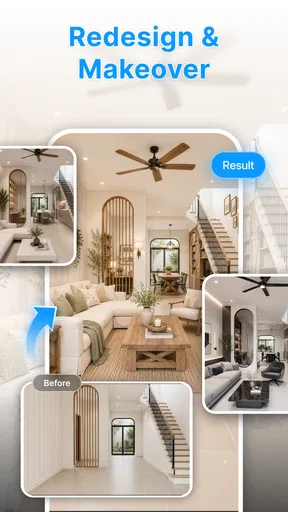
When I’m stuck between several ways to refresh a room, I find it easier to react to a visual idea than to keep debating style words in my head. Room Design AI: Home Decor is aimed at that early, exploratory stage: I can use AI-assisted design and editing to think through a direction before making changes at home. I would approach it as an idea generator, not as a measured plan or a guarantee of what a finished room will look like.
Start with a question, not a makeover brief
Before opening a room-design tool, I’d decide what I actually need to resolve. Is the room feeling too dark, too busy, or simply not like me? A single question gives me a better basis for judging a generated concept than a vague request to improve everything. It also makes it easier to explain the result to someone else: I can say what I was testing and whether the image moved me closer to an answer.
For example, if I’m choosing between a calmer bedroom and one with more color, I’d compare those as separate directions rather than changing several things at once. The useful outcome is not necessarily a perfect image; it may be realizing that I like the quieter palette but want to keep the room’s existing character. That distinction can stop an inspiration exercise from turning into an unnecessary full-room shopping list.
I would also keep a short note of what I want to preserve before experimenting: a favorite chair, a family piece, or storage that solves a daily problem. It gives me a practical filter when a design looks attractive but would not suit how I live. The most useful concept is the one that helps me make a real choice, not the one that looks most dramatic.
I would use Room Design AI: Home Decor as a place to explore possibilities before committing to a room makeover, not as a substitute for a measured floor plan or a professional design consultation. Its focus is AI-assisted room design and editing, which makes it most appealing when I have a space that feels unfinished and need visual ideas to get unstuck. The app is free, so trying it does not require an upfront purchase; that is a useful starting point, although free access alone does not tell me how well a particular design will suit my home.
Where the app’s value comes from
I’d judge the app’s value by whether its room concepts help me make a clearer decorating decision, rather than by how polished an image looks on its own. Since access is free, I can try that process without an upfront purchase; the practical question is whether it gives me a useful next step, such as a better brief or a direction worth testing in my home.
A low-cost way to start imagining a room
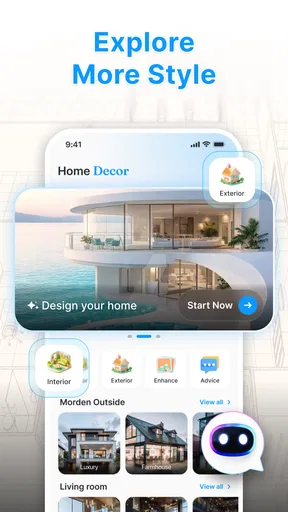
Room Design AI: Home Decor is an interior design app in the Art & Design category, developed by AMST FINANCIAL LLC. It is listed as free and rated Everyone, so it is approachable for casual inspiration as well as for people who are actively planning a change. The app’s first impression, from its purpose, is straightforward: use AI room design and editing tools to turn a room idea into something visual enough to discuss or refine.
Worth Reading Before You Choose

Baby Panda World Brings Quick Play to Modern Phones, but Its Game Library Feels Busy

ESPN’s Live Game View Makes Following Close Games Easier

QuizzLand Review: A Good Fit for Short Trivia Breaks, Not Every Player

Basketball Stars: Multiplayer Is Fast, but Can It Recover When Matches Go Wrong?

WEBTOON Turns Phone Updates Into a Better Reading Routine

Link to Windows Runs on Shared Habits, Not Social Feeds
That kind of value is different from buying furniture or hiring a designer. I see it as a way to make early decisions less abstract: whether a room might feel warmer, what direction to take with its look, or whether an idea is worth exploring further. A visual concept can help me explain what I mean to a housemate or family member much more clearly than saying “something modern, but cozy.” It can also reveal that two people are imagining very different outcomes before anyone spends money.
The app has reached over 50,000 installs, and its current release is version 1.0.2. It was released on August 1, 2026, and requires Android 7.0 or later. Those details make it easier to judge whether it is worth a try on an Android device, but they do not determine whether the app will match a specific decorating need. The useful test is whether its visual suggestions help me make a real decision rather than simply produce an attractive image.
Use it to compare directions, not to approve a purchase
The strongest practical use I can see is comparing broad design directions before narrowing down. For example, if I am unsure whether a small bedroom should feel lighter and simpler or more colorful and layered, I can use an AI-generated concept to give each idea a visual identity. The result is best treated as a conversation starter: it can help me name what I like, but it should not be mistaken for an exact preview of the finished room.
A useful workflow is to decide what question I want the design to answer before I begin. “Would a calmer palette work here?” is more actionable than “make this room look better.” After seeing a result, I would note one or two elements I want to keep and one that feels wrong, then use that reaction to refine the direction. This keeps the process tied to the actual room and avoids collecting attractive concepts without learning anything from them.
I would also separate visual inspiration from practical planning. A design image can suggest an overall mood, but I would still measure the room, check furniture dimensions, and verify that a proposed arrangement leaves sensible walking space. AI images can be persuasive even when they are not reliable evidence of scale, material availability, or how daylight behaves in a particular home. Use the generated design to guide choices, not to replace measurements.
Where AI editing helps—and where it can mislead
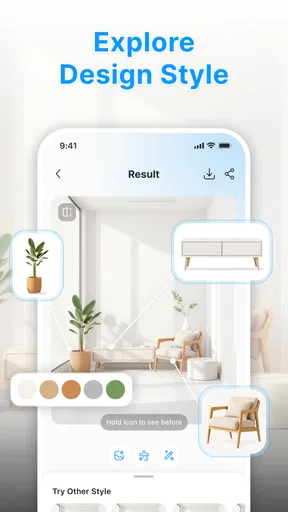
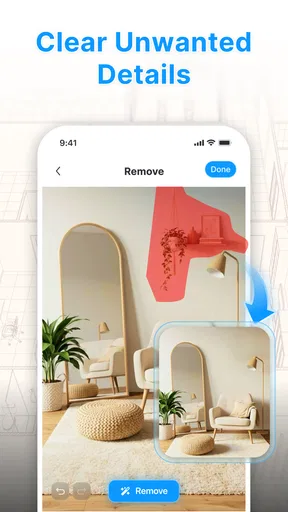
Smart editing tools are potentially valuable when the first concept is close but not quite right. Instead of abandoning a direction because one detail feels off, I can think in terms of targeted changes: keep the general mood, but reconsider the color balance or the way the room is presented. That is a more productive way to work than asking for a completely new idea each time, because it helps me identify which part of the concept is actually working.
There is a trade-off, though. AI design is strongest at giving a coherent visual impression, while home decisions often depend on details that are less visible: whether a chair is comfortable, whether a surface is easy to clean, or whether a suggested piece fits through a doorway. If I need a dependable furniture layout, a measurement-based room planner is a better match. If I need a decorator’s judgment about materials, lighting, or renovation constraints, a human professional has advantages this kind of app cannot be assumed to provide.
I would be cautious about treating a polished image as a shopping list. A generated look may communicate a style without identifying products that are available, affordable, or suitable for the space. Before buying anything, I would translate the image into a short set of real requirements—such as a color family, furniture shape, or storage need—and then compare actual items on their own merits. That extra step prevents the visualization from encouraging purchases based on appearance alone.
Everyday situations where it can earn its place
Imagine I have a living room that feels crowded, but I cannot tell whether the problem is too much furniture or simply a mismatched style. I could use the app to explore a more open-looking direction, then compare the concept against the furniture I already own. Even if the result is not a precise rendering, it may help me see that the main change I want is fewer competing colors rather than an entirely new set of furnishings. That can save time and keep the project grounded in what I already have.
It can also help when several people need to agree on a room. I would show a visual direction and ask specific questions—does this feel too formal, too plain, or too busy? That is easier to answer than a vague discussion about taste. For renters, the same process can be useful for exploring reversible changes such as color coordination and styling, while still checking lease terms before making any physical alteration.
Another worthwhile use is building a reference for a later conversation with a designer or contractor. I would save or describe the elements that matter to me and explain what the image gets wrong. The gap between an AI concept and my actual room can itself be useful: it clarifies priorities. But if the project involves structural changes, electrical work, or strict accessibility needs, I would move quickly from inspiration to qualified advice rather than relying on a visual tool.
What to expect from a newer, focused app
Because the app is at version 1.0.2, I would approach it as a relatively early product and judge it by the experience on my own device rather than assuming every workflow will be polished. That does not mean it is unsuitable; it simply makes a small, low-stakes trial sensible. I would start with one room and one clear design question, then decide whether the editing process produces ideas I can actually use.
The app is available for Android devices running version 7.0 or later. Its Everyone age rating makes it broadly suitable from a content-rating perspective, though that says nothing about whether the design tools fit a child’s needs or a professional workflow. On iOS, I would check the relevant app-store availability and compatibility before planning around it; Android requirements should not be treated as evidence of iOS support.
For cost, the confirmed point is simple: the app is free. I would not assume that this guarantees every tool or possible use is available without limits, nor would I assign a paid value to features without knowing their terms. The fair way to assess its value is to try the available experience and ask whether it saves me time, helps me make a clearer choice, or gives me a visual reference I could not easily create on my own. Its price makes experimentation accessible, but usefulness still depends on the result.
Who is likely to benefit most
I think this app suits people who have a room they want to refresh but need a visual push before deciding on a style. It is particularly relevant to beginners who find decorating language vague, people comparing a few broad looks, and households trying to communicate preferences. Since the tool is centered on AI room design and editing, it is also a reasonable option for someone who enjoys iterating on concepts rather than starting with a blank page and drawing a layout manually.
It is less suitable for anyone who needs exact dimensions, verified product recommendations, or technical renovation plans. A furniture-layout app built around measured walls is a better choice when the central question is whether a sofa will fit. A design professional is better when decisions involve construction, specialized materials, or a substantial budget. And if I already know exactly what I want and only need to purchase a particular item, an AI concept tool may add an unnecessary step.
Compared with the usual alternatives, the appeal here is quick visual exploration rather than precision drafting. Traditional mood boards give me more control over the references I collect, but they take time to assemble and may not show a unified room. A measurement-led planner can be more dependable for placement, while a professional can account for context and practical constraints. Room Design AI: Home Decor sits earlier in the process: it can help me decide what direction to investigate before I commit to one of those more exact approaches.
My verdict: try it for ideas, keep decisions grounded
I would recommend Room Design AI: Home Decor to a friend who wants help turning a fuzzy decorating idea into a visual starting point. Its free price makes a first try low-risk, and the focus on room design and smart editing gives it a clear purpose. I would use it to compare moods, clarify what I like, and prepare for a more informed conversation—not to decide measurements, guarantee a finished look, or shop directly from an image.
My advice is to begin with one room, a clear question, and realistic expectations. Keep the ideas that translate into practical choices, and use measured planning or professional guidance when accuracy matters. If you want inspiration and a way to make design conversations more concrete, this app is worth exploring. If you need precise layouts or dependable renovation guidance, I would choose a more specialized alternative instead.
A practical way to judge whether it is worth keeping
After a first session, I would ask whether the app helped me settle one decision: a palette, a general mood, or which existing pieces belong in the room. If I leave with a clearer brief for my next step, the free access has delivered something useful even if I do not use the concept as a literal blueprint. If I only collect images and remain just as unsure, I would switch to a hand-built mood board or a measured planner, depending on what is blocking me.
For a renter preparing a living room for guests, for instance, I might use a concept to test whether a lighter, less visually crowded direction feels right, then make small reversible changes using items already on hand. I would avoid buying anything until I had checked its dimensions and practical fit. That keeps the app in its strongest role—helping me think and communicate—while leaving consequential decisions to real measurements and real-world constraints.
Pros
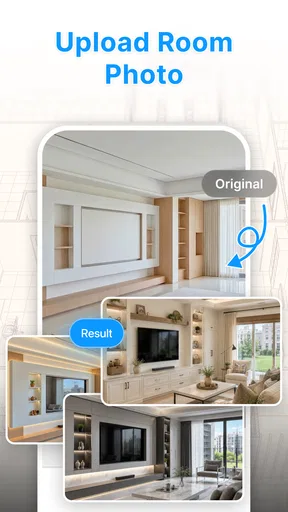
- Generates room concepts quickly from a photo or prompt.
- Offers inspiration for different interior styles.
- Useful for exploring color and furniture combinations.
- Simple workflow makes it approachable for beginners.
- Can help communicate design ideas before redecorating.
Cons
- AI results may alter room layouts or existing features.
- Some designs can look unrealistic or impractical.
- Results may vary depending on photo quality and prompts.
- Useful features or generations may require payment.
- Generated furniture may not match products available to buy.
FAQs for Room Design AI: Home Decor
What is Room Design AI: Home Decor?
Room Design AI: Home Decor is an app for exploring interior design ideas and visualizing potential room makeovers. It uses AI-assisted features to help transform a room photo into a different style or suggest decor inspiration. The exact tools and available styles may vary by app version, so check the current listing and in-app details before downloading if you need a particular feature.
How do I use the app to redesign a room?
Typically, you start by selecting or taking a photo of a room, then choose a design style or enter preferences for the look you want. The app generates a visual concept based on that input. For clearer results, use a well-lit photo with the room and its main features visible. Generated images are best treated as inspiration, not as guaranteed plans for construction or furnishing.
Is Room Design AI: Home Decor free to use?
The app may be free to download while reserving some features, generations, or design options for in-app purchases or a subscription. Pricing, trial availability, and usage limits can change, so review the current store listing and the purchase screen before starting a trial or paying. If you only want to experiment, check whether the free version includes enough generations for your needs.
Do I need to upload a photo, and what happens to my images?
Room redesign tools commonly require a room photo to create a personalized result, although some versions may offer other ways to begin. Before uploading, review the app’s privacy policy and the permissions it requests, especially if the image shows personal belongings or identifiable details. Check whether photos are stored, processed online, or shared, and remove images from your account if the app provides that option.
Can I rely on the AI designs when buying furniture or renovating?
AI-generated room images can help you compare styles, colors, and broad layout ideas, but they may not reflect exact dimensions, product availability, lighting, or structural requirements. Treat the results as visual inspiration rather than professional architectural or interior-design advice. Measure your room and furniture independently, verify product specifications, and consult a qualified professional before making costly purchases or starting renovation work.


